Pocket Lot: clear the first parking lot in six moves
Pocket Lot asks you to remove every car from a six-by-six lot. A clear-looking edge is only useful if the car can travel toward it: horizontal cars stay in their row, vertical cars stay in their column, and striped barriers close specific exits. The first lot teaches these restrictions without requiring any temporary parking moves.
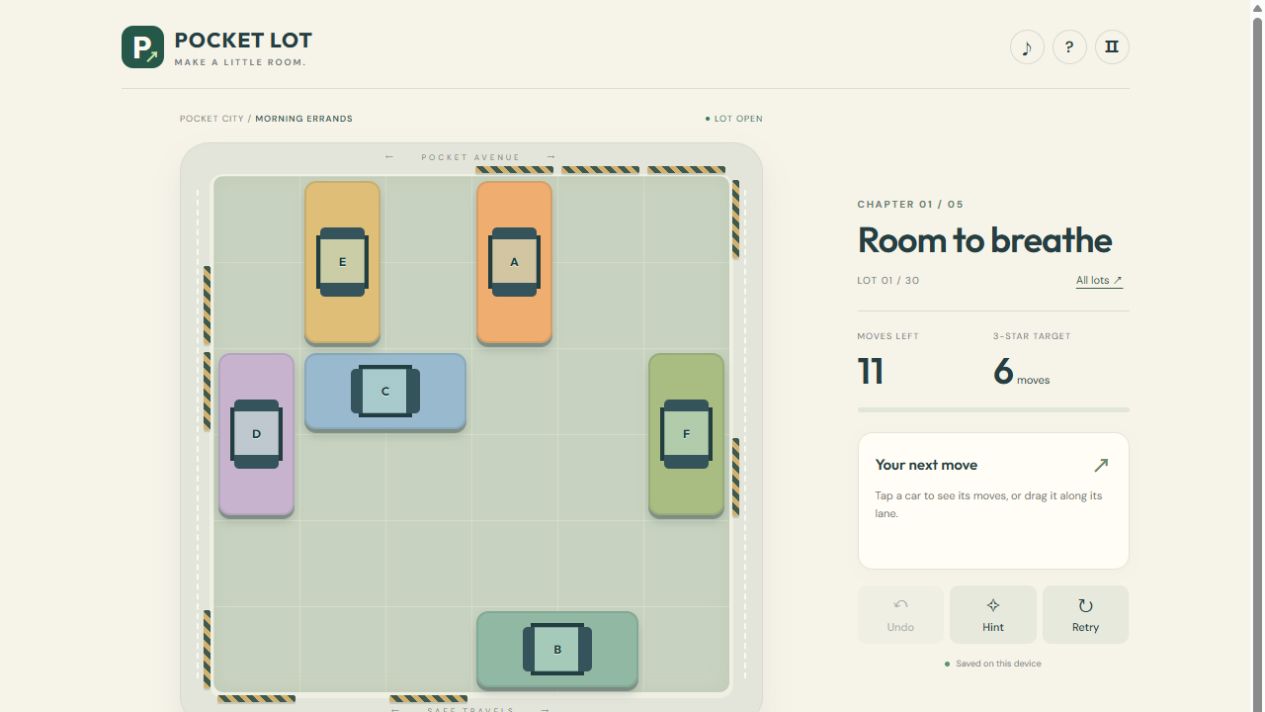
A complete opening you can repeat
Start Room to breathe from its untouched layout. Select B and use OUT to the right. Then send A down, D up, E up, F down and C right. Each action drives the selected car completely out of the lot. We checked this sequence in the game: all six cars leave in six moves and the result awards three stars. You can drag beyond the edge, but selecting the car and pressing its OUT button makes the intended move easier to reproduce.
Why those exits work
B occupies the bottom row beneath A’s column. Removing B first opens A’s downward path; A cannot leave upward because its top exit is striped. D can leave upward through the empty first-column cells, and E already has an open top edge. F’s lower path is clear. Once F is gone, C can leave to the right. C’s leftward route initially runs into D, so trying to send C left at the start will not work. This is a dependency puzzle: inspect what blocks an exit before deciding which car to select.
Count actions, not squares
One slide costs one move whether it travels one square or several. An exit also costs one move, even when the car starts far from the edge. Sliding B one square right and then driving out uses two moves; choosing OUT immediately uses one. Keyboard arrow keys move one square at a time, so use Shift plus the appropriate arrow for a clear exit. For longer internal slides, the numbered move buttons let you choose the distance in one action.
When another car must stay inside
Later lots introduce longer vehicles, flower beds and tighter move budgets. Start by checking for any car that can already leave: removing it frees space permanently. If none can exit, find a blocked exit and work backward through the vehicles in its lane. A temporary slide is useful when it opens that lane; moving a car back and forth without clearing another route only spends the budget. Flower beds cannot move, so do not plan a route through them.
Recover without abandoning the puzzle
Undo restores the previous position and returns its move. Hints suggest a move from the current board; they do not spend moves. If the available solution needs more moves than remain, the game asks you to undo or retry. The displayed target earns three stars, up to two extra moves earns two, and a later clear within the limit earns one. There is no timer. Unfinished moves, earned stars and unlocked lots save in this browser, so you can leave a difficult board and return to it.
About this guide
Rules checked against this edition’s game code and interface. The screenshot shows the actual game. Strategies are suggestions; they do not guarantee a particular score.