Mine Scout: turn one proven mine into a safe next move
The number on an open square counts mines in all eight neighboring positions, including diagonals. You do not need to guess the whole field at once. Look for one clue with enough information to settle a neighbor, then use that result to simplify the clues beside it. Mine Scout has ten mines and 54 safe squares on an eight-by-eight board.
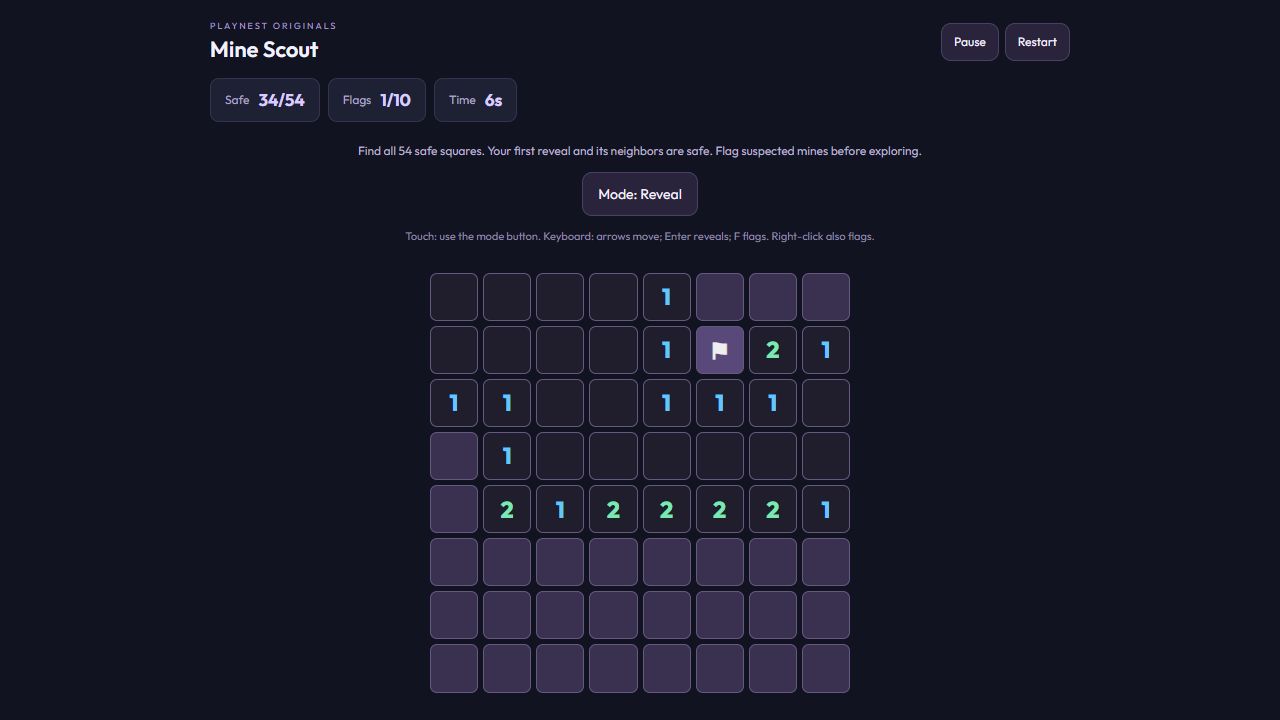
Read the flag in the screenshot
Look at row 3, column 6: it shows 1. Its neighbors in rows 3 and 4 are already open, as are row 2, columns 5 and 7. The only remaining covered neighbor is row 2, column 6, where the screenshot shows a flag. That square must contain the one mine. The flag records a deduction from the visible clues; placing a flag alone never proves a square is dangerous.
Use that mine to reveal a safe square
Now inspect the 1 at row 2, column 5. The flagged square at row 2, column 6 already accounts for its one neighboring mine. The covered square at row 1, column 6 must therefore be safe. In our check, revealing it increased the Safe count from 34 to 35 and showed a 2. Your own field will differ, but the rule transfers: once a clue’s full mine count is accounted for by proven mines, its other covered neighbors are safe.
Two questions to ask at each boundary
First subtract the neighboring mines you have actually proved from the clue. If the remaining count equals the number of unmarked covered neighbors, every one of those neighbors is a mine. If the remaining count is zero, every unmarked covered neighbor is safe. For example, a 2 with one proven adjacent mine and only one other covered neighbor makes that last neighbor a mine. If the remaining count is one but two candidates remain, that clue alone cannot tell you which to open. Look at overlapping clues before making a guess.
Use flags without getting trapped in Flag mode
Right-click a covered square to mark or unmark it. On touch screens, switch to Flag mode, tap the intended square, then return to Reveal mode before exploring. Keyboard arrows move focus and F toggles a flag. At most ten flags can be placed. A flagged square cannot be revealed until you remove its flag, and correctly flagging ten mines is not itself a win: all 54 safe squares must be opened. There is no automatic chord action that opens every neighbor of a numbered square.
What the safe first reveal does and does not promise
The field is generated when you first reveal a square, excluding that square and its neighbors from mine placement. Opening an empty region spreads into connected empty squares and their boundary numbers. This gives you a useful starting area, but it does not guarantee that every later position can be solved without a guess. If no clue resolves the current boundary, do not treat a familiar-looking pattern as proof. Restart generates a new field; this edition does not resume an unfinished minefield after reloading.
About this guide
Rules checked against this edition’s game code and interface. The screenshot shows the actual game. Strategies are suggestions; they do not guarantee a particular score.